How to Start a Podcast for Beginners: A Complete Step-by-Step Guide
Podcasting has become a popular way to share information, discuss interesting topics, tell stories, and connect with audiences. People listen to podcasts while working, traveling, exercising, or relaxing at home.
Starting a podcast does not necessarily require expensive equipment or a professional recording studio. With a clear topic, a basic recording setup, and consistent planning, beginners can start creating podcast episodes from home.
Whether you are a freelancer, student, content creator, or business owner, podcasting can help you develop communication skills and build an online presence.
In this guide, you will learn how to start a podcast from scratch, choose the right topic, record your first episode, publish your content, and attract listeners.
1. Choose Your Podcast Topic
The first step is deciding what your podcast will be about.
Choose a subject that interests you and that you can discuss regularly. Your topic should also be relevant to a specific audience.
Here are some podcast topic ideas:
Technology and digital trends
Freelancing and remote work
Business and entrepreneurship
Education and learning
Personal development
Books and literature
Travel and culture
Interviews with professionals
Entertainment and storytelling
Digital marketing
Try to avoid choosing an extremely broad topic. A focused subject can help listeners understand what your podcast offers.
For example, instead of discussing every aspect of technology, you could create a podcast about useful digital tools for beginners.
2. Identify Your Target Audience
Understanding your potential listeners helps you plan relevant episodes.
Think about:
Who would be interested in your podcast?
What topics do they want to learn about?
What problems or questions do they have?
What type of language and presentation would they prefer?
How much time might they spend listening?
For example, a podcast about beginner freelancing may target students, new freelancers, and people exploring remote work.
Knowing your audience can help you choose episode topics, language, length, and presentation style.
3. Choose a Podcast Name
Your podcast name should be easy to remember and related to your content.
Consider these tips:
Keep the name short and clear.
Make it easy to pronounce.
Avoid confusing spelling.
Choose a name that reflects your topic.
Check whether the name is already being used by another podcast or brand.
Check relevant social media usernames if you plan to create dedicated accounts.
You can also add a short tagline explaining what listeners can expect.
For example, a podcast called "Digital Skills Today" might use the tagline "Practical Ideas for Learning and Working Online."
4. Decide on Your Podcast Format
A podcast can follow different formats depending on your subject and resources.
Solo Podcast: You speak directly to listeners and explain topics using your own knowledge and research.
Interview Podcast: You invite guests to discuss their experiences, skills, or professional backgrounds.
Co-hosted Podcast: Two or more presenters discuss subjects together.
Educational Podcast: You teach concepts through structured episodes and practical examples.
Storytelling Podcast: You present stories, experiences, or carefully researched narratives.
You can start with a simple format and experiment with other styles as your confidence grows.
5. Plan Your First Episodes
Before recording, prepare a list of episode ideas.
A basic episode plan may include:
Episode title
Main topic
Introduction
Key discussion points
Examples or stories
Conclusion
Call to action
For example, your first five episodes could be:
Introducing Your Podcast
How to Develop Useful Digital Skills
Common Challenges for Beginners
Tools That Help People Work Online
Tips for Improving Productivity
Planning ahead helps you avoid running out of ideas after publishing your first episode.
6. Get the Basic Recording Equipment
You do not need a complicated recording setup to begin.
Some useful equipment includes:
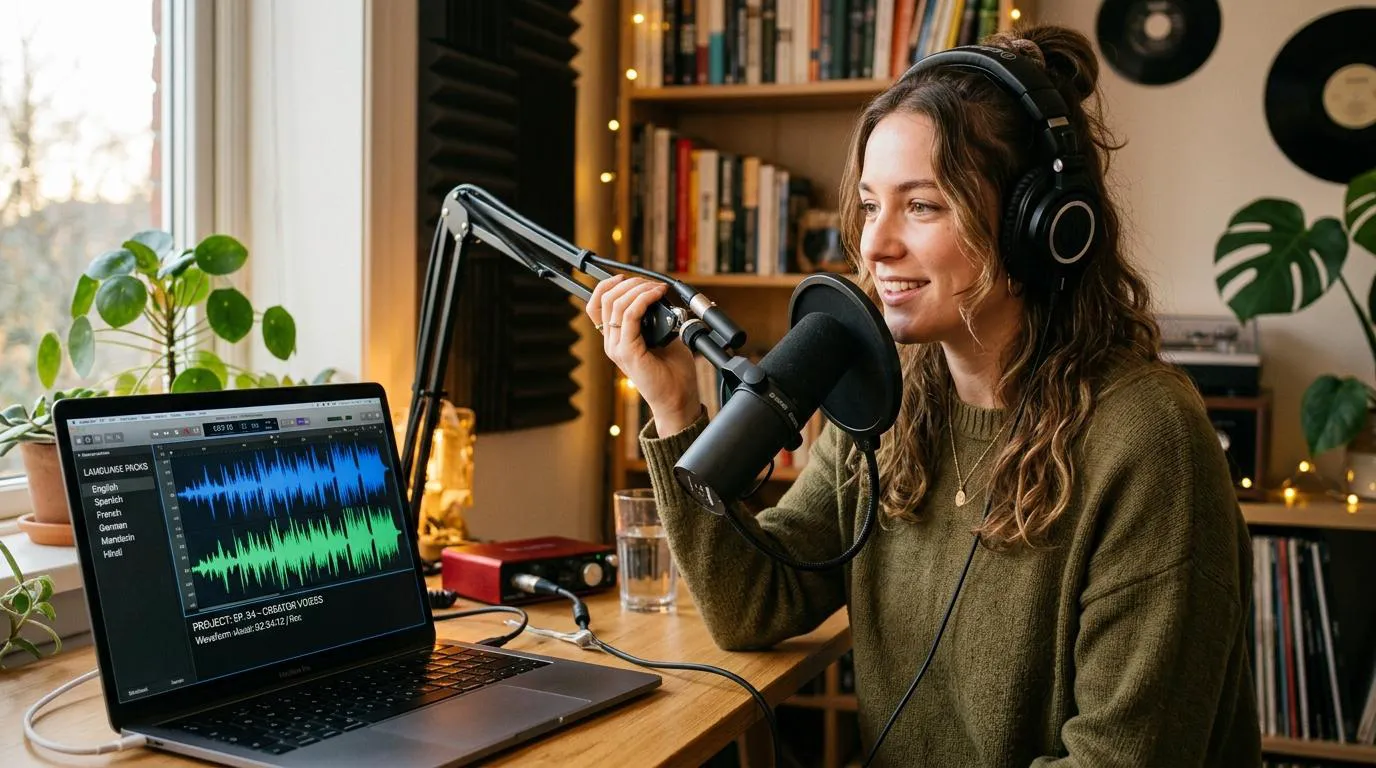
Microphone: A dedicated USB microphone can provide clearer audio than a basic built-in computer microphone.
Headphones: Headphones help you monitor sound and identify unwanted background noise.
Computer or Smartphone: You can use a computer or smartphone to record and manage audio files.
Recording Environment: Choose a quiet room with minimal background noise.
Pop Filter: This optional accessory can reduce harsh popping sounds caused by certain speech sounds.
Start with equipment that fits your budget. You can upgrade your setup as your podcast develops.
7. Choose Recording and Editing Software
You need software to record and prepare your podcast episodes.
Some commonly used options include:
Audacity: Free, open-source audio software suitable for recording and editing audio.
GarageBand: Audio recording and editing software available on supported Apple devices.
Adobe Audition: Professional audio editing software with advanced production features.
OBS Studio: Free software that can record audio and video, useful for video podcast workflows.
Descript: A content editing platform with audio and video editing features.
Compare their features and system requirements before choosing one.
Beginners can start with simple software and learn more advanced editing techniques over time.
8. Prepare Your Recording Space
Your recording environment affects audio quality.
A room with excessive echo, traffic noise, fans, or other distractions can make your podcast difficult to listen to.
Try these simple improvements:
Choose a quiet room.
Close nearby windows when necessary.
Turn off unnecessary noisy devices.
Keep the microphone at a comfortable distance.
Avoid recording in large, empty rooms with strong echo.
Test the sound before recording a complete episode.
Soft furnishings, curtains, and carpets may help reduce unwanted sound reflections.
You do not need a professional studio to produce understandable and enjoyable audio.
9. Record Your First Podcast Episode
Once your topic, equipment, and recording space are ready, record your first episode.
A simple recording process includes:
Review your episode outline.
Check your microphone and headphones.
Record a short test.
Listen to the test recording.
Begin recording the full episode.
Speak clearly and naturally.
Save a backup copy of the recording.
Do not worry about making every sentence perfect. You can remove unnecessary pauses and mistakes during editing.
If you are interviewing a guest, prepare questions in advance and check the recording setup with them before starting.
10. Edit Your Podcast Audio
Editing helps make an episode easier to listen to.
Basic editing tasks include:
Removing unnecessary pauses
Reducing distracting background noise
Adjusting volume levels
Removing repeated mistakes
Adding a short introduction
Adding an outro
Checking audio consistency
Use music only when you have the necessary rights or permission.
Avoid excessive sound effects or background music that makes speech difficult to understand.
Always listen to the edited episode before publishing it.
11. Create Podcast Cover Art
Your podcast cover art is one of the first things potential listeners may notice.
A professional cover should:
Include the podcast name.
Use readable typography.
Reflect the subject of the podcast.
Work well at small display sizes.
Use a simple and recognizable design.
Follow the image requirements of your chosen platform.
Avoid placing too much text or too many decorative elements in the design.
If you use photographs, illustrations, or other visual assets, make sure you have the appropriate rights to use them.
12. Choose a Podcast Hosting Platform
A podcast hosting platform stores your episode files and helps distribute your content.
Some popular services include:
Spotify for Creators
Buzzsprout
Podbean
Captivate
Transistor
Features and pricing differ between providers. Compare storage limits, distribution options, analytics, monetization features, and account requirements before choosing.
Check the current terms and availability in your country.
Many podcast platforms use an RSS feed to distribute episodes to supported listening services.
13. Publish Your Podcast Episodes
Before publishing, prepare the information listeners need.
Each episode should have:
A clear title
A useful description
The episode audio file
Relevant category information
Optional timestamps or show notes
Links to resources mentioned in the episode
Use descriptive episode titles instead of vague names.
For example, "How to Choose Your First Freelance Skill" is more informative than "Episode 3."
Check the audio and episode details before making the content public.
14. Promote Your Podcast
Publishing an episode does not automatically bring listeners. You need to help people discover your content.
Try these promotional methods:
Social Media: Share short audio clips, episode announcements, and useful discussion points.
YouTube: Publish video versions or selected clips when appropriate.
Blog Articles: Write articles based on podcast discussions and embed or link to relevant episodes.
Email Newsletter: Share new episode announcements with people who have subscribed.
Online Communities: Participate in relevant groups and share your podcast when community rules allow.
Guest Collaboration: Invite relevant guests and encourage them to share the episode with their audiences.
Focus on providing useful content instead of repeatedly posting promotional messages.
15. Maintain a Consistent Publishing Schedule
Consistency helps listeners understand when to expect new episodes.
You could publish:
One episode every week
Two episodes every month
One episode every two weeks
Choose a schedule that you can realistically maintain.
It is better to publish useful episodes consistently than to release several episodes at once and then stop for a long period.
Prepare some episodes in advance when possible. This can help you maintain your schedule during busy periods.
16. Measure Your Podcast Performance
Podcast analytics can help you understand how your content performs.
Depending on your hosting and distribution services, you may be able to review:
Episode downloads
Listener activity
Audience locations
Listening trends
Popular episodes
Follower growth
Use these insights to understand which topics interest your audience.
Do not judge your podcast only by download numbers. Listener feedback, meaningful engagement, and content quality also matter.
17. Explore Podcast Monetization
If your podcast develops an audience, you may eventually explore different ways to generate revenue.
Possible monetization methods include:
Sponsorships: Businesses may pay to have their products or services mentioned in relevant episodes.
Affiliate Marketing: You may earn a commission when listeners purchase eligible products through your affiliate links.
Premium Content: You can offer additional episodes or exclusive resources through a suitable membership service.
Your Own Products: A podcast can help introduce listeners to your courses, digital products, or services.
Listener Support: Some platforms allow audiences to support creators financially.
Monetization is not guaranteed. It usually requires valuable content, audience trust, and an appropriate business model.
Common Podcasting Mistakes to Avoid
Beginners sometimes make these mistakes:
Choosing a topic without understanding the audience
Buying expensive equipment before testing the idea
Recording without preparation
Ignoring audio quality
Publishing episodes with unclear titles
Using copyrighted music without permission
Releasing episodes inconsistently
Focusing only on promotion instead of content quality
Expecting immediate audience growth
Learn from each episode and improve your process gradually.
Final Thoughts
Starting a podcast can be a useful way to share knowledge, communicate ideas, and build an online audience. You can begin with a focused topic, basic recording equipment, simple editing software, and a realistic publishing schedule.
Your first episode does not need to be perfect. Focus on clear audio, useful discussions, and a positive listening experience. As you gain experience, you can improve your equipment, presentation, editing, and promotional strategy.
Keep learning new digital skills and explore online opportunities through GigBD.com as you develop your content creation journey.